 It's Free!
You may say to yourself, "I don't need an encryption program."
But, if you think about it, there are times you want to keep
your computer files safe from prying eyes, and we can help,
including:
- Encrypting personal or business files you may email to your
accountant, lawyers, co-workers, relatives, etc
- There are a number of places on the Internet where you can store
your files for free, including from some Internet Service Providers. But, who
wants to store their personal files on a public server? Who knows who could be
looking at your files on these systems. If you use our program you can encrypt
these files and save them on these semi-public servers. Since it's encrypted you
know prying eyes will not be able to read your data in it's current state.
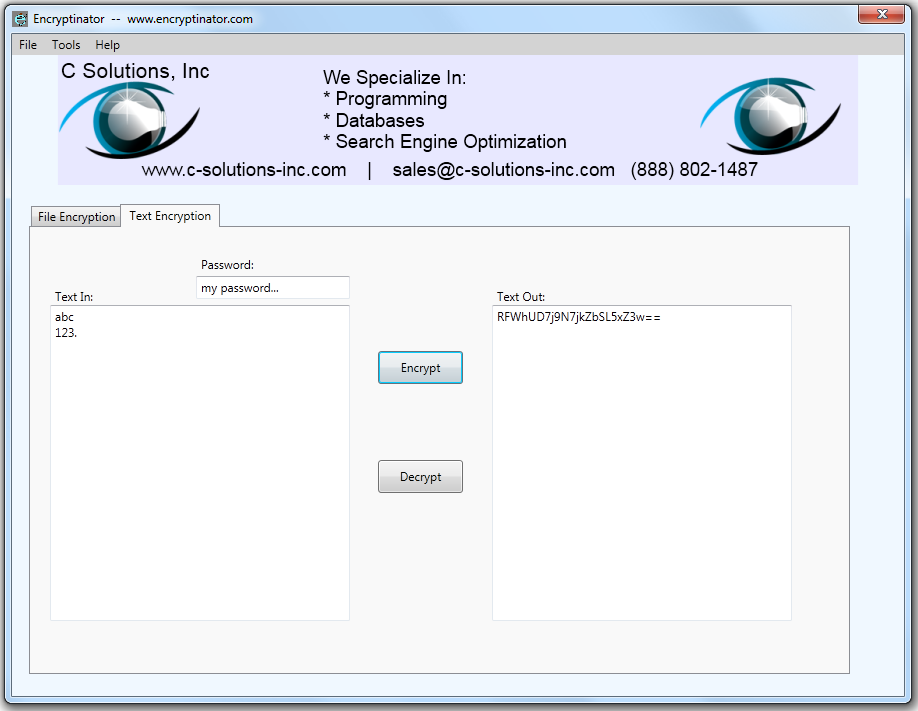
Encryptinator now supports easy encryption of text, as shown below. To decrypt the
message, simply put it's text in the 'Text In' texbox area, and hit the decrypt
button. It's that easy.
|
If you have a previous version, you can redownload the software
and it will automatically upgrade you to the latest version.
With our program you can create encrypted files. You can then send
these files in a secure manner. The file recipients can then download the free
version of our program. You give them the password and the encrypted file, then
they can decrypt the file and see it in it's original version.
Want to create an encrypted file?
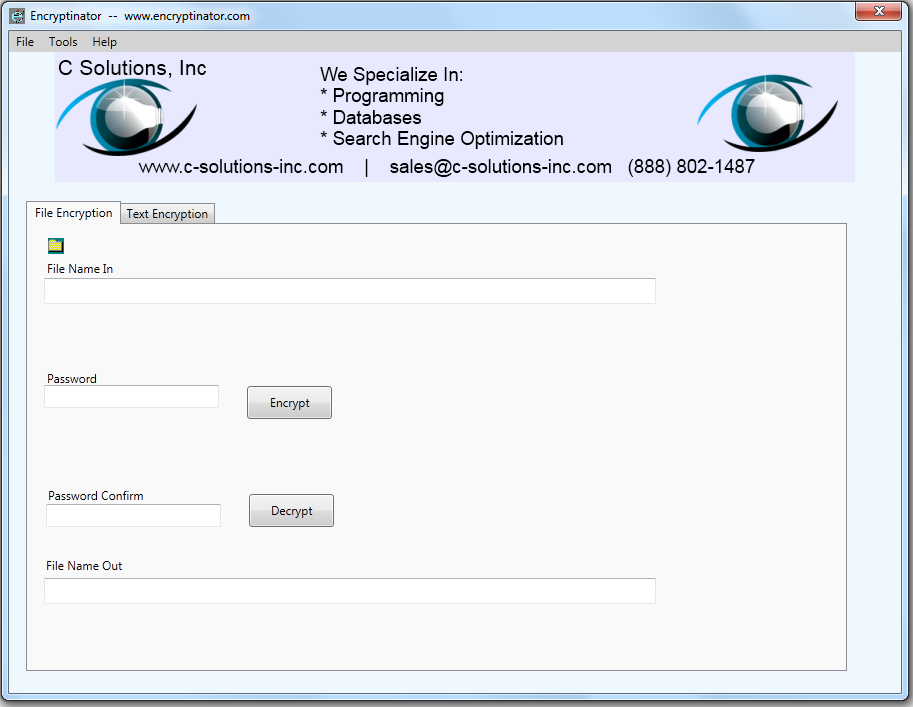
- Put in the name of the file you'd like to encrypt.
If you already know the filename type it in. If you'd like help
finding it, simply hit the
 graphic and a file chooser window will open. Double click on the file you'd like
to encrypt and we'll automatically type in the filename and automatically type
in the destination filename, with '.enct' added to the filename.
graphic and a file chooser window will open. Double click on the file you'd like
to encrypt and we'll automatically type in the filename and automatically type
in the destination filename, with '.enct' added to the filename.
- Enter the password you'd like to use
- Lastly, if you haven't done so yet, put in the file name you'd like to have the encrypted file outputted
to, with '.enct' at then end of the filename.
- Then, simply go to the 'Tools' menu, and select 'Encrypt'.
It's that easy.
Want to
decrypt a file
created with our program?
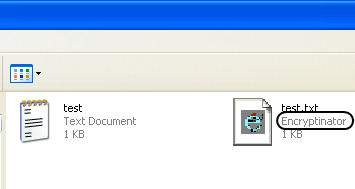
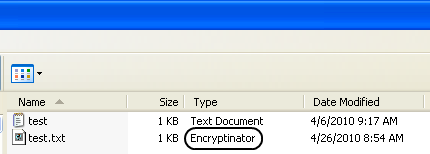
- Find the encrypted file with Windows Explorer. You can see files encrypted
with Encryptinator by their description, as show in the two examples below:
 |
 |
Or, simply fill in the encrypted file name in the top
box, for 'File In'
- Put in the password you used for the file
- Fill in the filename you'd like the decrypted file written to in the 'File
Name Out' textbox
- Then simply hit the 'Decrypt' menu item under the 'Tools' menu. It's that easy.
Additionally, to make it easier to choose the file you'd like to
encrypt, or decrypt, we have the added the section with
.
If you click over it this will bring up a windows dialog box which will make it
much easier to select the file you'd like to encrypt, or decrypt. By default, the filename
you have selected is copied to the File Name section and given the filename
extension of 'enct', to mark it as an encrypted file.
How strong is the encryption we use to safeguard your files? So
strong it's government approved with the AES Encryption Standard.
Additionally, for an added level of security your password is encrypted before it is under as the key.
Program Requirements:
- Windows Computer
- Operation System: Windows XP or higher, this includes XP/Vista/7
- 700 MB Hard Drive Space
- Screen display area of at least 1024 x 768 pixels
Downloading and/or installation of the files for Encryptinator is allowed for users in all nations certified by the US government
as allowed under export controls. If you download or install this program you certify you are not in any of the noncertified countries which include: Cuba, Iran, North Korea, Sudan, and Syria, and any others which are currently on this list.
Version History:
1.1.3
11-16-2010
- Increased screen items font size
- Minor bug fixes
1.1.2
11-11-2010
- Application made free, includes clickable ads on the top of the screen
- Added text encryption/decryption
1.1
11-04-2010
-
Added section to show percentage complete on current encryption/decryption task
- 'Look enhancements'
- Show, after encryption or decryption, "Open Directory" buttons which allow you to open the directory for the location of the file input or file ouptut directory, depending on which of the two buttons are hit
- Added gray background to top menu area
- Add ad to top of screen in free/demo mode, removed on purchase
1.0.5
05-26-2010
- Removed June 1, 2010 time limit for creating encrypted files
- Free version created which allows encryption of files under 1 MB
- Pro version created which removes the 1 MB file encryption file size limit
- Show in app title bar the currently running program version, Free or Pro, as
well as the app website address - 'www.encryptinator.com'
1.0.4
04-26-2010
- Added file association for extension 'enct' to go along with Encryptinator
program. Shows in the file description as 'Encryptinator
- After install, whenever a file with extension 'enct' is double clicked, the Encryptinator program is automatically opened and the 'File Name In' value is automatically filled in as the double clicked on filename
- Application looks at the name of the 'File Name In' value, and, if it has '.enct'
it sets the 'File Name Out' value to be what the 'File Name In' value is without
the extension '.enct
- Application looks at the name of the 'File Name In' value, and, if it does not
have '.enct' at the end, as an extension, it sets the 'File Name Out' value to
be what the 'File Name In' value is with the extension '.enct'
added to the end
1.0.0.3
04-15-2010
- Added ability to select files for encryption and decryption from windows
dialog box
- Added 'Documentation' menu item under Help which links to product's main
webpage which shows instructions
- Widened width for file in and file out textboxes
- Added 'Tools' menu item
- Added 'Encrypt' to 'Tools' menu item
- Added 'Decrypt' to 'Tools' menu item
- Added 'Decrypt' to 'Tools' menu item
- Removed 'Encrypt' button
- Removed 'Decrypt' button
- After putting into 'File Name in' the chosen filename from the Open Dialog
box, in the 'File Name Out' textbox, the name of the chosen file is
automatically placed here with a default extension of '.enc'
- Added menu item Copy 'File In' Name To 'File Out'
- Added program icon
1.0.0.2
04-06-2010
- Greatly enhanced processing speed
1.0.0.1
04-05-2010
- Added File/Exit command and ability to exit program
1.0.0.0
04-05-2010
|